
library(tidymodels)
library(vip)
library(regclass)
library(MASS)
library(rpart.plot)
library(bonsai)
library(pROC)
Show code cell output
── Attaching packages ────────────────────────────────────────────────────────────────────────────────────────────────────────────────────────────────────────────────────────────────────────── tidymodels 1.3.0 ──
✔ broom        1.0.7     ✔ recipes      1.1.1
✔ dials        1.4.0     ✔ rsample      1.2.1
✔ dplyr        1.1.4     ✔ tibble       3.2.1
✔ ggplot2      3.5.1     ✔ tidyr        1.3.1
✔ infer        1.0.7     ✔ tune         1.3.0
✔ modeldata    1.4.0     ✔ workflows    1.2.0
✔ parsnip      1.3.0     ✔ workflowsets 1.1.0
✔ purrr        1.0.4     ✔ yardstick    1.3.2
── Conflicts ───────────────────────────────────────────────────────────────────────────────────────────────────────────────────────────────────────────────────────────────────────────── tidymodels_conflicts() ──
✖ purrr::%||%()    masks base::%||%()
✖ purrr::discard() masks scales::discard()
✖ dplyr::filter()  masks stats::filter()
✖ dplyr::lag()     masks stats::lag()
✖ recipes::step()  masks stats::step()
Attaching package: ‘vip’
The following object is masked from ‘package:utils’:

    vi
Loading required package: bestglm
Loading required package: leaps
Loading required package: VGAM
Loading required package: stats4
Loading required package: splines
Attaching package: ‘VGAM’
The following object is masked from ‘package:workflows’:

    update_formula
Loading required package: rpart
Attaching package: ‘rpart’
The following object is masked from ‘package:dials’:

    prune
Loading required package: randomForest
randomForest 4.7-1.2
Type rfNews() to see new features/changes/bug fixes.
Attaching package: ‘randomForest’
The following object is masked from ‘package:ggplot2’:

    margin
The following object is masked from ‘package:dplyr’:

    combine
Important regclass change from 1.3:
All functions that had a . in the name now have an _
all.correlations -> all_correlations, cor.demo -> cor_demo, etc.
Attaching package: ‘MASS’
The following object is masked from ‘package:dplyr’:

    select
Type 'citation("pROC")' for a citation.
Attaching package: ‘pROC’
The following objects are masked from ‘package:stats’:

    cov, smooth, var
Decision Tree and Random Forest#
Partition/Tree Model#
A partition model (also widely known as a decision tree) makes predictions via a set of rules.
If first week’s sales \(>\) 60 units and product is type B and season is summer, then classify as success.
If first week’s sales \(>\) 60 units and product is type C and season is summer, then classify as failure.
If first week’s sales \(\le\) 60 units and product is type B and season is winter, then predict sales in week 5 to be 17.4.
These rules define what partition a new observation belongs to and how a new individual is classified/predicted.
Note
Unlike linear and logistic regression which assume a very specific equation and form relating the \(y\) and the \(x\) variables, partition models do not assume any particular relational form between the two, so they are nonparametric and generally quite flexible and widely applicable.
Note
Rules as Partitions as Regions of Data Space:
Although partition models can be thought of as a set of rules, what they are really doing is splitting the data space (all possible combinations of individuals’ characteristics, the \(x\)’s) into separate regions called partitions.
Show code cell source
set.seed(13237); nobs <- 20
x1 <- runif(nobs); x2 <- runif(nobs); y1 <- 10*(5 + 3*x1 -7*x2 + rnorm(nobs,0,.5))
y2 <- exp(-1 + x1 + x2)/(1 +exp(-1 + 1*x1 + 1*x2) )
p <- (max(y2)-y2)/(max(y2)-min(y2))
lab <- rbinom(nobs,1,p)
plot(x1,x2,xlim=c(0,1),ylim=c(0,1),pch=14*lab+1,cex=2,xlab="x1",ylab="x2")
m <- 2.32; abline(0-m*0.128,m,col="red",lwd=3)
m <- -1.81; abline(0.741-m*0.443,m,col="red",lwd=3)
points(.3,.1,pch=1,cex=2)
#points(.3,.6,pch=8,cex=2)
#points(.4,0.2,pch=8,cex=2)

Two classes: open circle and filled square
The two lines have split the data space (possible combinations of \(x_1\) and \(x_2\) values) into four distinct partitions (though only 3 of the 4 have individuals in them for this example).
Classification with Partitions#
The partition model predicts a common class membership for every individual in a partition according to ``majority rules”. Consider the two starred points in the plots.
Show code cell source
set.seed(13237); nobs <- 20
x1 <- runif(nobs); x2 <- runif(nobs); y1 <- 10*(5 + 3*x1 -7*x2 + rnorm(nobs,0,.5))
y2 <- exp(-1 + x1 + x2)/(1 +exp(-1 + 1*x1 + 1*x2) )
p <- (max(y2)-y2)/(max(y2)-min(y2))
lab <- rbinom(nobs,1,p)
plot(x1,x2,xlim=c(0,1),ylim=c(0,1),pch=14*lab+1,cex=2,xlab="x1",ylab="x2")
m <- 2.32; abline(0-m*0.128,m,col="red",lwd=3)
m <- -1.81; abline(0.741-m*0.443,m,col="red",lwd=3)
points(.3,.1,pch=1,cex=2)
points(.3,.6,pch=8,cex=5,col="blue")
points(.4,0.2,pch=8,cex=5,col="green")

The blue individual (\(x_1 = 0.3\) and \(x_2=0.6\)) is classified as a square since squares have the majority in the partition (in fact, all are squares in this partition).
The green individual(\(x_1 = 0.4\) and \(x_2 = 0.2\)) would be classified as a circle since that circles are more common that squares (5 to 4) in that partition.
Regression with Partitions#
The partition model predicts the \(y\) value for a new individual by averaging together the \(y\) values of all individuals who share the partition. Consider the two starred points in the plots.
Show code cell source
set.seed(13237); nobs <- 20
x1 <- runif(nobs); x2 <- runif(nobs); y1 <- 10*(5 + 3*x1 -7*x2 + rnorm(nobs,0,.5))
y2 <- exp(-1 + x1 + x2)/(1 +exp(-1 + 1*x1 + 1*x2) )
p <- (max(y2)-y2)/(max(y2)-min(y2))
lab <- rbinom(nobs,1,p)
plot(x1,x2,xlim=c(0,1),ylim=c(0,1),pch=14*lab+1,cex=2,xlab="x1",ylab="x2",col="white")
for (i in 1:length(p)) {
  text(x1[i],x2[i],round(100*p[i],digits=1),cex=0.7)
}
m <- 2.32; abline(0-m*0.128,m,col="red",lwd=3)
m <- -1.81; abline(0.741-m*0.443,m,col="red",lwd=3)
points(.3,.6,pch=8,cex=3,col="blue")
points(.4,0.2,pch=8,cex=3,col="green")

The blue individual (\(x_1 = 0.3\) and \(x_2=0.6\)) has a predicted value of \(y\) equal to the average \(y\) of individuals in the partition:
\(mean( c(40.8,34,39.2,59,65.7,85.3,100) ) = 60.6\)
The green individual(\(x_1 = 0.4\) and \(x_2 = 0.2\)) has a predicted value of \(y\) equal to the average \(y\) of individuals in the partition:
\(mean( c(59.9,48.2,52.3,58.4,47.1,75,65.8,58.9) ) = 58.2\)
Rules for rules#
There are an infinite variety of rules we could consider:
If \(x_1\) is between 2 and 4 then \(\ldots\)
If \(x_1 < x_2\), then \(\ldots\)
If \(x_1^4 - 2x_1^3 + 8x_1^2 -3x_1 < 0\), then \(\ldots\)
If \(3x_1x_2 > 15\)
If \(x_1\) is level A or B then \(\ldots\), otherwise if C then \(\ldots\), otherwise D or E do \(\ldots\)
To keep models simple and quick to build, we will only consider rules that:
Are binary. An ok rule is “if \(x_1 < 5\) then \(\ldots\); if \(x_1 \ge 5\) then \(\ldots\)”. A forbidden rule is “if \(x_1 < 5\) then \(\ldots\); if \(5 \le x_1 \le 7\) then \(\ldots\); if \(x_1>7\) then \(\ldots\).
Involve a single variable at a time and whether it is larger or smaller than some threshold (e.g., \(x_1 \ge 5\) vs. \(x_1 < 5\)). A forbidden rule is ``if \(x_1 + x_2 \ge 5\) vs. \(x_1 + x_2 < 5\).
Involve two groupings of levels of categorical variables. AB vs. CDE is ok. AB vs. C vs. DE is not (since it is not binary).
Although a partition model does not explicitly assume any particular functional form between the probability an individual belongs to a class and his or her characteristics, the construction procedure itself implicitly puts limitations on what partitions look like (i.e., the possible ways that individuals can be ``clustered”).
Note
Since decision rules involve only one variable at a time and whether that variable is above or below a certain threshold, a partition will always be a rectangular region of the data space.
Since a partition is a cluster of ``similar” individuals, this means we are assuming that class boundaries can be approximated by a series of (potentially jagged) rectangles or that individuals within (some set of) rectangular region of the data space have similar values of \(y\). This may or may not be a good approximation!
A partition model splits the data space into rectangular regions. It classifies all individuals in a region to be the majority class in that region. At first, it may seem like this won’t work since the boundaries seem to be ``diagonal lines”.
Show code cell source
plot(0,0,col="white",xlim=c(0,1),ylim=c(0,1),xlab="x1",ylab="x2")
points( c(0.8,0.85,0.95,1),c(0.1,0.7,0.8,0.3),col="red",pch=20,cex=2)
points( c(0.2,0.25, 0.55, 0.6),c(0.1,0.12,0.04,0.2),col="blue",pch=20,cex=2)
points( c(0.22,0.24, 0.44, 0.61),c(0.37,0.33,0.34,0.36),col="blue",pch=20,cex=2)
points( c(0.1,0.18, 0.05, 0.06),c(0.35,0.63,0.34,0.36),col="red",pch=20,cex=2)
points( c(0.07,0.23, 0.36, 0.37),c(0.55,0.63,0.74,0.86),col="red",pch=20,cex=2)
points( c(0.47,0.53, 0.56, 0.64),c(0.55,0.63,0.74,0.86),col="blue",pch=20,cex=2)
abline(.2,1.1)
abline(-1.4,2.55)

Actually, with the ``right” set of partitions, the model does just fine! Partition models will work well when the boundaries between classes are well-described a series of (potentially quite thin/small) rectangles.
Show code cell source
plot(0,0,col="white",xlim=c(0,1),ylim=c(0,1),xlab="x1",ylab="x2")
abline(v=0.7,lwd=12)
lines( c(-5,.7),c(.3,.3),lwd=9)
lines( c(-5,.7),c(.4,.4),lwd=6)
lines( c(0.2,.2),c(.3,.4),lwd=4)
lines( c(.4,.4),c(0.4,2),lwd=1)
points( c(0.8,0.85,0.95,1),c(0.1,0.7,0.8,0.3),col="red",pch=20,cex=2)
points( c(0.2,0.25, 0.55, 0.6),c(0.1,0.12,0.04,0.2),col="blue",pch=20,cex=2)
points( c(0.22,0.24, 0.44, 0.61),c(0.37,0.33,0.34,0.36),col="blue",pch=20,cex=2)
points( c(0.1,0.18, 0.05, 0.06),c(0.35,0.63,0.34,0.36),col="red",pch=20,cex=2)
points( c(0.07,0.23, 0.36, 0.37),c(0.55,0.63,0.74,0.86),col="red",pch=20,cex=2)
points( c(0.47,0.53, 0.56, 0.64),c(0.55,0.63,0.74,0.86),col="blue",pch=20,cex=2)

Basic construction#
The goal of a partition model is to find the “best” set of rules, i.e., the ones that maximize its “success” at classification or numerical prediction.
To simplify construction, the rule set is grown one at a time (too many possible rules to consider all of them at once).
A single rule will start off this process, and this will the one that increases the tree’s ability to classify “the best”, e.g., it may start off with “if \(x_1 < 5\) then Class A, if \(x_1 \ge 5\) then Class B”
A new rule always builds off one of the rules that came before it. For example, it may build on the first half of the previous rule: ``if \(x_1 < 5\) and gender is male then Class A / if \(x_1 < 5\) and gender is female then Class B”. Both halves of a previous rule are never added to simultaneously.
More details are forthcoming, but the key takeaway is that the tree will be constructed one rule at a time.
The rectangles that define the set of partitions can be written as a set of rules, which can be in turn captured by a decision tree.
Consider the following data space of \(x_1\) and \(x_2\) where individuals are either triangles or dots It is clear that by following these four rules, we can achieve perfect classification.
If \(x_1>0.5\) and \(x_2 > 0.6\), then Dot
If \(x_1>0.5\) and \(x_2 \le 0.6\), then Triangle
If \(x_1<0.5\) and \(x_2 > 0.4\), then Triangle
If \(x_1<0.5\) and \(x_2 \le 0.4\), then Dot
These 4 rules can be written as a decision tree
If \(x_1>0.5\) and \(x_2 > 0.6\), then Circle
If \(x_1>0.5\) and \(x_2 \le 0.6\), then Triangle
If \(x_1<0.5\) and \(x_2 > 0.4\), then Triangle
If \(x_1<0.5\) and \(x_2 \le 0.4\), then Circle
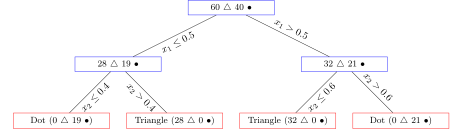
The nodes of the decision tree are labeled to help tell the ``story” of the model.
Originally, all individuals are in the same partition (60 triangles/40 dots)
The first rule added (\(x_1 \le 0.5\) vs. \(x_1 > 0.5\)) creates a branch, and this corresponds to splitting the partition in two. The one on the “left” now has 28 triangles/19 dots. The one on the “right” now has 32 triangles and 21 dots.
The second rule added (\(x_2 \le 0.4\) vs. \(x_2 > 0.4\) applied to the ``left” partition) creates another branch and splits the `left” partition in two (each of which contains only members of one class!).
The third rule added (\(x_2 \le 0.6\) vs. \(x_2 > 0.6\) applied to the “right” partition) creates another branch and splits the “right” partition in two (each of which also contains only members of one class!).
Tree Terminology#
A tree is a set of nodes and branches. A node is a partition and represents a group of individuals who all satisfy a set of conditions (e.g., \(x_1 < 5\), gender = male, and \(x_2 \ge 10\)). A pair of branches coming off a node represents a decision rule (e.g., \(x < 5\) vs. \(x \ge 5\), red vs. not red) that further splits the node in two child partitions. The leafs represent the final partitions of the tree.

Adding a new rule to the tree is equivalent to dividing/splitting one of the existing partitions in two halves.
Splitting a partition in two is equivalent to adding a new rule to the tree.
Predictions with Tree#
Before discussing how exactly the partition is model is made, let us discuss how it makes classifications and predictions.
Note
To make a prediction with a decision tree, simply start at the top of tree and answer the questions posed by each rule as you run into them. When you end up in a leaf / terminal partition:
Classification: the ``probability” of being in each class equals the proportion of individuals in the training data in that partition. The majority class dictates the classification.
Numerical Prediction: the predicted \(y\) value is the average value of \(y\) among all other individuals in the leaf.
In R, the decision tree will be presented so that the “base” or “root” node is at the top and each node poses a question.
If the answer to that question is ``yes”, you head off along the left branch.
If the the answer to that question is ``no”, you head off along the right branch.
There will be a reminder at the top of the tree which direction you take when the answer is yes/no!
Classify a customer who is 40 years old, LoyaltyDays of 644, Lapse of 8 months.
Start at the top. Since the answer to the question “Is the value of LoyaltyDays less than 356” is no, you head off to the right and ask the question “Is the value of Lapse 8 Months or Very Long?”. Yes, so head off to the left and answer the question ``Is the value of LoyaltyDays less than 601”. No, so head to the right. The labeled node gives the proportion of the \(n=29\) individuals in the training data that live in that partition. Since 96.6% is the larger number, we classify this person as being reacquired (Yes class, with a probability of 96.6%).
Show code cell source
data(CUSTREACQUIRE, package='regclass')
names(CUSTREACQUIRE)[4] <- "LoyaltyDays"
x <- CUSTREACQUIRE$Lapse
y <- ifelse(CUSTREACQUIRE$Lapse<=62,"2 Months",ifelse(CUSTREACQUIRE$Lapse<=124,"4 Months",
                                                        ifelse(CUSTREACQUIRE$Lapse<=186,"8 Months","Very Long" )) )
CUSTREACQUIRE$Lapse <- factor(y)
TREE <- rpart(Reacquire~LoyaltyDays+OfferAmount+Lapse+PriceChange+Gender+Age,data=CUSTREACQUIRE,cp=.03)
visualize_model(TREE)

Note
Often, during the processing of making a prediction, it may be the case that you have more information than the tree needs! For example, you may have data on \(x_1\), \(x_2\), \(\ldots\), \(x_{10}\) but only a few of those variables are in the path that you follow.
That’s fine, and actually good news! The tree naturally incorporates variable selection and interactions between variables. Sometimes you may need a variable and other times you may not.
Imagine predicting the success of a product launch based on product type (B) and number of thousands of units sold the first week (4). We’d predict success with probability 75% and failure with probability 25% since 75% of the 71 products in the leaf were successful.
Predict birthweight of a baby born at 40 weeks to a 5-ft smoking mother.
Show code cell source
data(EX9.BIRTHWEIGHT)
TREE <- rpart(Birthweight~.,data=EX9.BIRTHWEIGHT,cp=0.02)
visualize_model(TREE)

Right (40 is NOT less than 38), right (40 is NOT less than 40), left (Smoking=now is yes), so predict 3420 grams (the average of 112 similar babies).
Huge Strength of Partition Models: Interactions#
For many problems, interactions between variables often play an important role.
If \(x_1\) and \(x_2\) have an interaction, then the form/strength of the relationship between \(y\) and \(x_1\) depends on the exact value of \(x_2\) under consideration (sale price of homes rise much more quickly with square area in NYC than in Knoxville, so
area" andlocation” have an interaction).Interactions are very difficult to put into regression models (usually add the product of the two variables as an additional interaction, but this is only a specific type of interaction).
Note
Partition models naturally incorporate interactions between variables without having to explicitly define them!
Reaquisition:
LoyaltyDays and Lapse have an interaction.
Relationship between probability of reacquisition vs. Lapse is sometimes weak (in fact nonexistent if LoyaltyDays \(<\) 356) and sometimes strong (Lapse matters if LoyaltyDays \(\ge\) 356)
Birthweight:
Gestation and Smoking have an interaction.
The difference in average birthweights for smoking vs. non-smoking mothers is sometimes small (214g; when Gestation \(\ge 40\)); sometimes large (298g; when Gestation between 38 and 40 for shorter mothers); sometimes nonexistent (when Gestation \(<\) 38).
Tree building procedure#
A partition model is a set of rules that can be captured by a decision tree. So what is the ``best” set of rules?
Note
There are many different approaches for developing rules, all of which are based on minimizing the ``impurity” of partitions (a partition that contains only one class or a single value of \(y\) is 100% pure).
Three measures of impurity that R uses are:
Entropy (information)
Gini index (guessing accuracy)
Sum of Squared Errors (SSE) for numerical prediction
Regardless of the criteria chosen, the partition model is built by sequentially adding new rules one at a time. When a new rule is to be added, all possible new rules (i.e., considering ALL possible rules involving of ALL possible variables in ALL partitions) are considered and the one that decreases the impurity of the model the most is chosen.
The partition on the left has a high impurity because there is a roughly even mix of the two classes. The partition on the right has a low impurity because the members are predominantly one class.
Show code cell source
set.seed(1735); x <- runif(100); y <- runif(100)
plot(y~x,xlab="x1",ylab="x2",pch=20,col="white")
color <- c()
for (i in 1:100) { color[i] <- if(x[i]<.5){ sample(c("red","blue"),1) } else { sample(c("red","blue"),1,prob=c(.92,.08)) } }
points(y~x,col=color,pch=20)
abline(v=0.5,lwd=8)

Entropy#
The entropy is one way to measure of the impurity of a partition. It is a numerical value that uses the proportion of individuals in a partition that belong to each class.
In information theory, the entropy is related to the amount of information contained in a ``message” (a string of 1s and 0s). Entropy and information are opposites. Messages with more entropy contain less information. Partitions with more entropy contain less information about an individuals class.
The goal is to develop rules that minimize the entropy of partitions and maximize the information they contain.
A partition has 10 members of class A, 10 members of class B, and 10 members of class C. This class distribution has the maximum possible entropy because the least possible information is available about the class label (being a three-way tie and equally likely to be any of them):
Another partition has 27 members of class A, 2 members of class B, and 1 member of class C. This class distribution has a lot of information about the potential class label since it is highly likely to be A, thus the entropy of this partition is lower.
-(  1/3*log(1/3,base=2) +  1/3*log(1/3,base=2) + 1/3*log(1/3,base=2)  )
-(  27/30*log(27/30,base=2) +  2/30*log(2/30,base=2) + 1/30*log(1/30,base=2)  )
Another partition has 30 members of class A and no members of any other class. This distribution is completely informative as to an individual’s class. The entropy equals 0. Smaller values of entropy are “better” with 0 being the smallest value possible.
Gini Index#
The Gini index can be thought of as the probability of misclassification when the ``random guess” model (not naive model) make classifications for individuals in that partition.
A Gini index of 0 means the partition is 100% pure (all one class). Larger values of Gini index are worse.
A partition has 10 members of class A, 10 members of class B, and 10 members of class C. A random guess model would pick a class at random since each are equally likely, thus there’s a 2/3 chance of it being wrong.
A partition has 27 members of class A, 2 members of class B, and 1 member of class C. The random guess model guesses A with probability 27/30, B with probability 2/30, and C with probability 1/30. In the long run it will be wrong about 18% of the time.
1 - ( (1/3)^2 + (1/3)^2 + (1/3)^2 )
1 - ( (27/30)^2 + (2/30)^2 + (1/30^2 ) )
A partition has 30 members of class A and no members of any other class. The random guess model will always classify as A, and will always be correct. The misclassification rate is 0, so \(Gini=0\) in this case.
SSE Criteria#
When \(y\) is numerical, the ``sum of squared errors” of the partitions are considered. The \(SSE\) for a partition is simply the sum of squared deviations of individual values of \(y\) from the overall average in that partition (\(\bar{y}\)).
When considering rules that split a parent partition into two partitions (child 1 has an average value of \(y\) of \(\bar{y}_1\) while child 2 has an average value of \(y\) of \(\bar{y}_2\)), we calculate:
Impurity of a split#
Regardless of the measure of impurity (entropy, Gini, SSE), the impurity of a split (a new rule) is a weighted average of the impurities of the resulting partitions.
Here \(n_{partition1}\) are the number of individuals who end up in the first partition after the split and \(n_{partition2}\) are the number of individuals who end up in the second partition after the split.
Split example (Regression)#
For a very simple example, imagine the following data
X |
Y |
|---|---|
1.2 |
0 |
1.8 |
5 |
3.1 |
5 |
4.2 |
4 |
5.8 |
8 |
If the split was \(x \le 2.45\) vs \(x > 2.45\), the resulting partitions would be {0,5} (average 2.5) and {5,4,8} (average 17/3). The SSE of the split is \((0-2.5)^2+(5-2.5)^2+(5-17/3)^2+(4-17/3)^2+(8-17/3)^2 = 21.2\).
If the split was \(x \le 3.65\) vs \(x > 3.65\), the resulting partitions would be {0,5,5} (average 10/3) and {4,8} (average 6). The SSE of the split is \((0-10/3)^2+(5-10/3)^2+(5-10/3)^2+(4-6)^2+(8-6)^2 = 24.7\).
The first split is better because its SSE is smaller.
Split example (Classification)#
For a very simple example, imagine the following data
X |
Class |
|---|---|
1 |
A |
2 |
B |
3 |
A |
4 |
B |
5 |
B |
If the rule was \(x \le 1.5\) vs \( > 1.5\), the resulting partitions would be {A} (impurity 0) and {BABB} (impurity 0.375). The impurity of the split is \((0\times 1 + 0.375\times 4)/5 = 0.3\).
If the rule was \(x \le 2.5\) vs \( > 2.5\), the resulting partitions would be {AB} (impurity 0.5) and {ABB} (impurity 0.44). The impurity of the split is \((0.5\times 2 + 0.44\times 3)/5 = 0.46\).
If the rule was \(x \le 3.5\) vs \( > 3.5\), the resulting partitions would be {ABA} (impurity 0.44) and {BB} (impurity 0). The impurity of the split is \((0.44\times 3 + 0\times 2)/5 = 0.26\).
If the rule was \(x \le 4.5\) vs \( > 4.5\), the resulting partitions would be {ABAB} (impurity 0.5) and {B} (impurity 0). The impurity of the split is \((0.5\times 4 + 0\times 1)/5 = 0.4\).
New decision rule and split will be \(x \le 3.5\) vs \( > 3.5\) since that results in the lowest impurity!
Strategy for a split#
Imagine the decision tree already has a bunch of rules and thus quite a few leaves (terminal partitions). How do we know what rule to add next to a tree? The procedure is basically a thrice-nested \(for\) loop:
Note
Consider some partition and a variable on which to base a new rule. Exhaustively, try all thresholds (\(x \ge threshold\) vs. \(x < threshold\)) for the rule and find the threshold for that partition/rule combo that gives the lowest impurity.
Numerical variables consider thresholds that are midway between its unique values. If the unique values of \(x\) are 4,6, and 9, then the rules \(x\le 5\) vs. \(x > 5\) and \(x \le 7.5\) vs. \(x > 7.5\) are considered.
Categorical variables use rules that consider combinations of levels. If there are 4 levels ABCD, the rules considered are A vs. BCD, B vs. ACD, C vs. ABD, D vs. ABC, AB vs. CD, AC vs. BD.
This process is repeated for this partition for all variables, and the best rule is noted.
This process is then repeated for all current terminal partitions, and the best rule overall is added to the ruleset.
Note
Because new rules consider one variable at a time and whether its value exceeds a certain threshold, and because the only thresholds considered are midway between unique values of the numerical predictor variable, transformation of the predictor variables are not necessary.
Imagine the \(x\) values are 1.1, 1.5, 2.7, 5.5, 9.7.
Transformations like logarithms, square roots, etc. preserve the ordering of the original values.
If the rule was \(x < 2.1\) vs. \(x \ge 2.1\), then two individuals are placed in the left partition and three on the right. If we worked with \(\log x\) instead, the rule would be \(\log x < 0.32\), but those same two individuals are placed on the left and the same three individuals are placed on the right.
This is another strength of partition models (like their ability to incorporate interactions naturally)! Note: when we use this to predict a numerical response (instead of doing classification), it can still help to make the distribution of \(y\) as Normal as possible.
Again, the tree and the rules that compose it are built in stages.
All individuals begin in the same partition (the base node). Find the rule that decreases the impurity the most and add it into the model. This splits the base node in two.
For each of these two child partitions, find the rule that decreases the impurity of each partition the most (these rules will likely be different for each partition). The partition whose rule was the better of the two (biggest decrease in impurity) is split in two and that rule is introduced into the model. There are three total partitions now.
Repeat the procedure of finding the best rule for each partition and adding to the model whichever rule decreases the impurity the most. Every time a rule is introduced, one of the partitions is split, so the number of partitions grows at each step by one.
The tree-building procedure is called recursive since the next step uses the results of the step before it.
Rule 1 splits the base node into two partitions. Then, for each resulting partition separately, the best split is considered. Whichever split yields the smallest overall impurity for the tree (i.e., the largest reduction in overall impurity) is taken.
Determining Split 2:

Rule 2 ended up splitting the right partition into two. The procedure repeats by finding the best place to split over all three partitions.
Determining Split 3:

Rule 3 ended up splitting the middle partition into two. The procedure repeats by finding the best place to split over all FOUR partitions.
Determining Rule 4:
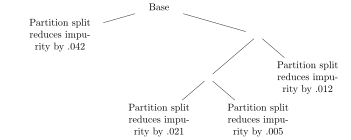
The process continues to repeat. Although the number of partitions grows by one after each split, the optimal split does not have to be recalculated for every one, since the optimal new rule for all but 2 (the two new partitions) have previously been found.
Determining Rule 5:

At first glance, it may seem like the procedure for building the tree is quite arduous. As the number of partitions increases, the best rule for each one needs to be discovered, so the number of computations gets longer and longer and slows the process down, right? Nope!
When a partition is split in two, only the two new partitions need to be looked at. We already know the best rule for the partitions that weren’t split and what the decrease in the impurities would be.
Since child partitions contain fewer individuals that their parent, the number of possible rules in child partitions can only decrease (the number of thresholds may get smaller with fewer unique values of predictor variables).
The procedure actually gets faster the farther along in the tree-building process.
Determining Number of Splits#
Adding another split (rule) to the tree will always decrease the impurity of the resulting tree (much like adding an additional predictor variable to a regression model will always improve its fit on the training data). Thus, we need a strategy that tells us when to stop.
Note
Continue to build the tree until the best new rule does not decrease the impurity by “enough”. Refuse to split any partition that contains “too few” individuals.
This way, the tree will eventually stop growing either when the number of individuals in the partitions becomes too small to justify another split, or when adding a new rule does not improve the tree enough to justify the added complexity.
Continue to add rules as long as impurity decreases by at least cp, or cost_complexity, the complexity parameter of a tree.
Larger values of \(cp\) lead to smaller trees (an additional split has to improve the fit a lot) while smaller \(cp\) lead to larger trees (a small improvement in fit is acceptable).
Note
The ``optimal” value of \(cp\) is dataset dependent and must be determined via crossvalidation (choose the \(cp\) that results in the model that has the lowest estimated generalization error or any other in accordance with the one standard deviation rule).
The best new rule will only be added to the model if:
The decrease in overall impurity is at least \(cp\) when doing classification.
The increase in overall \(R^2\) is at least \(cp\) when doing numerical prediction.
Example#
data(WINE, package='regclass')

set.seed(474)
tt_split <- initial_split(WINE, prop = 0.75)
TRAIN <- training(tt_split)
HOLDOUT <- testing(tt_split)

REC <- recipe(Quality ~ ., TRAIN) %>%
    step_normalize(all_predictors())

WF <- workflow() %>%
    add_recipe(REC) %>%
    add_model(decision_tree( mode = 'classification', cost_complexity = tune() ))

GRID <- expand.grid(
    cost_complexity = 10^seq(-3,-1,length=20)
)

set.seed(474)
RES <- WF %>%
    tune_grid(
        resamples = vfold_cv(TRAIN, v = 5),
        grid = GRID,
    )

METRICS <- collect_metrics(RES)

METRICS

METRICS %>%
    ggplot(aes(cost_complexity, mean)) + geom_point() + facet_wrap(~ .metric, scales = 'free')
| cost_complexity | .metric | .estimator | mean | n | std_err | .config |
|---|---|---|---|---|---|---|
| <dbl> | <chr> | <chr> | <dbl> | <int> | <dbl> | <chr> |
| 0.001000000 | accuracy | binary | 0.8395062 | 5 | 0.006625387 | Preprocessor1_Model01 |
| 0.001000000 | brier_class | binary | 0.1262106 | 5 | 0.004283865 | Preprocessor1_Model01 |
| 0.001000000 | roc_auc | binary | 0.8950704 | 5 | 0.006109157 | Preprocessor1_Model01 |
| 0.001274275 | accuracy | binary | 0.8404938 | 5 | 0.007472961 | Preprocessor1_Model02 |
| 0.001274275 | brier_class | binary | 0.1261792 | 5 | 0.004303545 | Preprocessor1_Model02 |
| 0.001274275 | roc_auc | binary | 0.8933434 | 5 | 0.006649003 | Preprocessor1_Model02 |
| 0.001623777 | accuracy | binary | 0.8424691 | 5 | 0.005487929 | Preprocessor1_Model03 |
| 0.001623777 | brier_class | binary | 0.1255390 | 5 | 0.004236835 | Preprocessor1_Model03 |
| 0.001623777 | roc_auc | binary | 0.8935462 | 5 | 0.007969444 | Preprocessor1_Model03 |
| 0.002069138 | accuracy | binary | 0.8414815 | 5 | 0.005261056 | Preprocessor1_Model04 |
| 0.002069138 | brier_class | binary | 0.1262114 | 5 | 0.004188389 | Preprocessor1_Model04 |
| 0.002069138 | roc_auc | binary | 0.8926081 | 5 | 0.008505744 | Preprocessor1_Model04 |
| 0.002636651 | accuracy | binary | 0.8434568 | 5 | 0.004319224 | Preprocessor1_Model05 |
| 0.002636651 | brier_class | binary | 0.1243673 | 5 | 0.003324666 | Preprocessor1_Model05 |
| 0.002636651 | roc_auc | binary | 0.8968097 | 5 | 0.008414561 | Preprocessor1_Model05 |
| 0.003359818 | accuracy | binary | 0.8454321 | 5 | 0.005662886 | Preprocessor1_Model06 |
| 0.003359818 | brier_class | binary | 0.1230270 | 5 | 0.004654966 | Preprocessor1_Model06 |
| 0.003359818 | roc_auc | binary | 0.8979992 | 5 | 0.009779445 | Preprocessor1_Model06 |
| 0.004281332 | accuracy | binary | 0.8454321 | 5 | 0.007594349 | Preprocessor1_Model07 |
| 0.004281332 | brier_class | binary | 0.1242634 | 5 | 0.006060351 | Preprocessor1_Model07 |
| 0.004281332 | roc_auc | binary | 0.8881057 | 5 | 0.011109012 | Preprocessor1_Model07 |
| 0.005455595 | accuracy | binary | 0.8444444 | 5 | 0.008076754 | Preprocessor1_Model08 |
| 0.005455595 | brier_class | binary | 0.1243337 | 5 | 0.006258019 | Preprocessor1_Model08 |
| 0.005455595 | roc_auc | binary | 0.8842840 | 5 | 0.010667298 | Preprocessor1_Model08 |
| 0.006951928 | accuracy | binary | 0.8429630 | 5 | 0.010807935 | Preprocessor1_Model09 |
| 0.006951928 | brier_class | binary | 0.1258239 | 5 | 0.007350452 | Preprocessor1_Model09 |
| 0.006951928 | roc_auc | binary | 0.8747060 | 5 | 0.012339653 | Preprocessor1_Model09 |
| 0.008858668 | accuracy | binary | 0.8449383 | 5 | 0.007823694 | Preprocessor1_Model10 |
| 0.008858668 | brier_class | binary | 0.1268156 | 5 | 0.005484545 | Preprocessor1_Model10 |
| 0.008858668 | roc_auc | binary | 0.8647555 | 5 | 0.009177414 | Preprocessor1_Model10 |
| 0.011288379 | accuracy | binary | 0.8454321 | 5 | 0.007870310 | Preprocessor1_Model11 |
| 0.011288379 | brier_class | binary | 0.1267292 | 5 | 0.005493650 | Preprocessor1_Model11 |
| 0.011288379 | roc_auc | binary | 0.8636268 | 5 | 0.009209310 | Preprocessor1_Model11 |
| 0.014384499 | accuracy | binary | 0.8454321 | 5 | 0.007870310 | Preprocessor1_Model12 |
| 0.014384499 | brier_class | binary | 0.1267292 | 5 | 0.005493650 | Preprocessor1_Model12 |
| 0.014384499 | roc_auc | binary | 0.8636268 | 5 | 0.009209310 | Preprocessor1_Model12 |
| 0.018329807 | accuracy | binary | 0.8454321 | 5 | 0.007870310 | Preprocessor1_Model13 |
| 0.018329807 | brier_class | binary | 0.1267292 | 5 | 0.005493650 | Preprocessor1_Model13 |
| 0.018329807 | roc_auc | binary | 0.8636268 | 5 | 0.009209310 | Preprocessor1_Model13 |
| 0.023357215 | accuracy | binary | 0.8419753 | 5 | 0.005737753 | Preprocessor1_Model14 |
| 0.023357215 | brier_class | binary | 0.1275132 | 5 | 0.004915302 | Preprocessor1_Model14 |
| 0.023357215 | roc_auc | binary | 0.8621944 | 5 | 0.007960602 | Preprocessor1_Model14 |
| 0.029763514 | accuracy | binary | 0.8306173 | 5 | 0.008174294 | Preprocessor1_Model15 |
| 0.029763514 | brier_class | binary | 0.1299998 | 5 | 0.005781754 | Preprocessor1_Model15 |
| 0.029763514 | roc_auc | binary | 0.8604095 | 5 | 0.008750346 | Preprocessor1_Model15 |
| 0.037926902 | accuracy | binary | 0.8261728 | 5 | 0.009125787 | Preprocessor1_Model16 |
| 0.037926902 | brier_class | binary | 0.1325650 | 5 | 0.005764569 | Preprocessor1_Model16 |
| 0.037926902 | roc_auc | binary | 0.8565001 | 5 | 0.009256744 | Preprocessor1_Model16 |
| 0.048329302 | accuracy | binary | 0.8000000 | 5 | 0.005120109 | Preprocessor1_Model17 |
| 0.048329302 | brier_class | binary | 0.1544420 | 5 | 0.005199306 | Preprocessor1_Model17 |
| 0.048329302 | roc_auc | binary | 0.8032645 | 5 | 0.013266802 | Preprocessor1_Model17 |
| 0.061584821 | accuracy | binary | 0.7960494 | 5 | 0.005874260 | Preprocessor1_Model18 |
| 0.061584821 | brier_class | binary | 0.1622862 | 5 | 0.003431814 | Preprocessor1_Model18 |
| 0.061584821 | roc_auc | binary | 0.7795760 | 5 | 0.003044273 | Preprocessor1_Model18 |
| 0.078475997 | accuracy | binary | 0.7960494 | 5 | 0.005874260 | Preprocessor1_Model19 |
| 0.078475997 | brier_class | binary | 0.1622862 | 5 | 0.003431814 | Preprocessor1_Model19 |
| 0.078475997 | roc_auc | binary | 0.7795760 | 5 | 0.003044273 | Preprocessor1_Model19 |
| 0.100000000 | accuracy | binary | 0.7960494 | 5 | 0.005874260 | Preprocessor1_Model20 |
| 0.100000000 | brier_class | binary | 0.1622862 | 5 | 0.003431814 | Preprocessor1_Model20 |
| 0.100000000 | roc_auc | binary | 0.7795760 | 5 | 0.003044273 | Preprocessor1_Model20 |

Please find out the best model with the largest accuracy and the corresponding variable importance:
BEST <- select_best(RES, metric = "accuracy")
BEST

MODEL <- WF %>%
    finalize_workflow(BEST) %>%
    fit(TRAIN)
MODEL

MODEL %>%
    extract_fit_engine() %>%
    rpart.plot()

vip(MODEL)
| cost_complexity | .config |
|---|---|
| <dbl> | <chr> |
| 0.003359818 | Preprocessor1_Model06 |
══ Workflow [trained] ══════════════════════════════════════════════════════════════════════════════════════════════════════════════════════════════════════════════════════════════════════════════════════════════
Preprocessor: Recipe
Model: decision_tree()

── Preprocessor ────────────────────────────────────────────────────────────────────────────────────────────────────────────────────────────────────────────────────────────────────────────────────────────────────
1 Recipe Step

• step_normalize()

── Model ───────────────────────────────────────────────────────────────────────────────────────────────────────────────────────────────────────────────────────────────────────────────────────────────────────────
n= 2025

node), split, n, loss, yval, (yprob)
      * denotes terminal node

  1) root 2025 815 low (0.40246914 0.59753086)
    2) alcohol>=0.2906463 736 167 high (0.77309783 0.22690217)
      4) free.sulfur.dioxide>=-1.317862 686 126 high (0.81632653 0.18367347)
        8) alcohol>=1.216826 290  18 high (0.93793103 0.06206897) *
        9) alcohol< 1.216826 396 108 high (0.72727273 0.27272727)
         18) fixed.acidity< 0.5747665 305  63 high (0.79344262 0.20655738)
           36) volatile.acidity< 1.700294 298  57 high (0.80872483 0.19127517)
             72) free.sulfur.dioxide>=-0.7625658 231  33 high (0.85714286 0.14285714) *
             73) free.sulfur.dioxide< -0.7625658 67  24 high (0.64179104 0.35820896)
              146) volatile.acidity< -0.8774242 23   1 high (0.95652174 0.04347826) *
              147) volatile.acidity>=-0.8774242 44  21 low (0.47727273 0.52272727)
                294) fixed.acidity< -0.1450246 27   8 high (0.70370370 0.29629630) *
                295) fixed.acidity>=-0.1450246 17   2 low (0.11764706 0.88235294) *
           37) volatile.acidity>=1.700294 7   1 low (0.14285714 0.85714286) *
         19) fixed.acidity>=0.5747665 91  45 high (0.50549451 0.49450549)
           38) residual.sugar>=-0.9802736 69  27 high (0.60869565 0.39130435)
             76) pH>=-0.8903578 42  10 high (0.76190476 0.23809524)
              152) total.sulfur.dioxide>=-0.6807032 33   4 high (0.87878788 0.12121212) *
              153) total.sulfur.dioxide< -0.6807032 9   3 low (0.33333333 0.66666667) *
             77) pH< -0.8903578 27  10 low (0.37037037 0.62962963)
              154) citric.acid>=0.7949176 7   1 high (0.85714286 0.14285714) *
              155) citric.acid< 0.7949176 20   4 low (0.20000000 0.80000000) *
           39) residual.sugar< -0.9802736 22   4 low (0.18181818 0.81818182) *
      5) free.sulfur.dioxide< -1.317862 50   9 low (0.18000000 0.82000000) *
    3) alcohol< 0.2906463 1289 246 low (0.19084562 0.80915438)
      6) volatile.acidity< -0.7853629 256 109 high (0.57421875 0.42578125)
       12) density>=0.8979856 74  10 high (0.86486486 0.13513514) *
       13) density< 0.8979856 182  83 low (0.45604396 0.54395604)
         26) alcohol>=-0.2753523 89  33 high (0.62921348 0.37078652)
           52) sulphates>=-1.060717 79  25 high (0.68354430 0.31645570)
            104) total.sulfur.dioxide< 0.076148 63  15 high (0.76190476 0.23809524)
              208) citric.acid< 0.2060359 38   4 high (0.89473684 0.10526316) *
              209) citric.acid>=0.2060359 25  11 high (0.56000000 0.44000000)
                418) volatile.acidity< -1.061547 13   2 high (0.84615385 0.15384615) *
                419) volatile.acidity>=-1.061547 12   3 low (0.25000000 0.75000000) *
            105) total.sulfur.dioxide>=0.076148 16   6 low (0.37500000 0.62500000) *
           53) sulphates< -1.060717 10   2 low (0.20000000 0.80000000) *
         27) alcohol< -0.2753523 93  27 low (0.29032258 0.70967742)
           54) free.sulfur.dioxide>=-0.4849176 53  23 low (0.43396226 0.56603774)
            108) total.sulfur.dioxide< 0.157655 28   9 high (0.67857143 0.32142857) *
            109) total.sulfur.dioxide>=0.157655 25   4 low (0.16000000 0.84000000) *
           55) free.sulfur.dioxide< -0.4849176 40   4 low (0.10000000 0.90000000) *
      7) volatile.acidity>=-0.7853629 1033  99 low (0.09583737 0.90416263)
       14) pH>=0.9202279 129  39 low (0.30232558 0.69767442)
         28) alcohol>=0.00764703 24   6 high (0.75000000 0.25000000)

...
and 4 more lines.
Warning message:
“Cannot retrieve the data used to build the model (so cannot determine roundint and is.binary for the variables).
To silence this warning:
    Call rpart.plot with roundint=FALSE,
    or rebuild the rpart model with model=TRUE.”


Alcohol content seems to be the most important predictor of quality.
We can use \(rpart\) to fit a particular tree and to study it.
FINALTREE <- rpart(Quality~.,data=TRAIN,cp=0.02)  #Use higher cp to make tree visualizable
rpart.plot(FINALTREE)

Pros and Cons#
Pros of partition models#
Trees have many advantages over linear/logistic regression and nearest neighbor models.
Faster to develop on large datasets with many variables
Handle categorical variables without creating new indicator variables
Handle quantitative variables without modification or transformation
Not too sensitive to outliers in the \(x\)’s
Handle missing data easily (other models completely omit cases with any info missing)
Naturally incorporate complex interactions between variables (\(x_2\) may have different splitting rules depending on the values of \(x_1\)); extremely difficult to pick out the ``right” interactions in regression.
You don’t ever need to consider (monotonic) transformations in \(x\) (the splitting rules would be the same).
Equation free
Cons of partition models#
However, they have a few key drawbacks
If \(y\) is numerical, still have to figure out exactly what to predict! (original values, transformation, etc.)
Often don’t predict as well as regression models (especially when regression provides a reasonable reflection of the relationship)
Usually overfit (even when cross-validation is used to estimate \(cp\)), i.e., too many rules
No tests of significance about predictors, and no way to immediately find confidence/prediction intervals for new data
High variance - entire tree structure can be sensitive to a single observation. While the predicted values may not change much when a new point is added or deleted to the model, the decision rules can change drastically. Complicate understanding the relationship.
Lack of interpretability. It’s not possible to easy say ``two otherwise identical individuals who differ in \(x\) by 1 unit are expected to differ in \(y\) by \(\ldots\) units. How \(y\) and \(x\) vary together is hidden in the tree.
There is one final important consideration that applies to all tree-based models.
Note
All tree-based models have a slight bias towards creating rules based on variables that have more unique values. This makes sense because with more unique values, the more possible rules that could be created, and the larger than chance that one of them ``look good” by a happy accident.
Discretization (replacing numerical values with range categories like 0-5, 5-10, etc.) and combining levels can help eliminate this bias and is an important consideration during the data cleaning/preparation stage.
Bagging and Random Forests#
Motivation#
Note
Without looking at a clock, what time do you think it is right now?
Most likely, you have a reasonable idea of the current time, but your guess may be off by perhaps 5 or so minutes.
What if we instead asked everyone in a room to guess the current time and averaged their guesses? People probably have a good instinct for approximately what time it is, but their guesses may be too high or too low.
Note
The accuracy of the average of many guesses is much higher than the accuracy of a typical individual’s guess under many conditions (mainly assuming that individuals’ guesses are more or less independent from one another).
To show that this is the case, let us imagine that people are reasonable good at estimating the time, typically being off by 5 minutes or so. Let us further assume that the distribution of possible times that people might guess has a Normal distribution, centered at the correct time and with a standard deviation of 5 minutes.
Show code cell source
curve( dnorm(x,0,5), from=-15,to=15,xlab="Error in Time Guess of Individuals",ylab="Relative Probability")

If we ask a single person for their guess, we’ll of course use it as our ``best guess”, but we see that it could be off by a bit.
What if we used the average of 30 different people’s guesses? It turns out the typical size of the error will be substantially smaller. About 1 minute in the simulation:
errors <- c()  #initialize a vector to keep track of errors made by average
for (i in 1:5000) { #Find the errors for 5000 different groups of 30 students
  #Generate random errors for 30 individuals' guesses:  Normally distributed mean 0 SD 5
  guesses <- rnorm(30,0,5)
  errors[i] <- mean(guesses)
}
hist(errors,freq=FALSE,
     ylab="Relative Probability",xlab="Error in Time Guess of Average of 30",main="")
curve(dnorm(x,0,5/sqrt(30)),col="red",add=TRUE)

This observation opens up a whole new way to approach classification and predictions!
This discussion provides the motivation for two additional modeling approaches:
Random forests (bagging) - build a collection of partition models which are as independent (uncorrelated) as possible, and take the average of the predictions.
Ensembling - build a collection of models that approach a problem from different perspectives (Naive Bayes, Nearest Neighbor, Logistic Regression, Partition, etc.) with the hope that they will be roughly independent and average together the predictions.
Both of these approaches have revolutionized the field of data mining and analytics. For the moment we will focus on Random Forests:
Note
Can we average together a bunch of tree models?
Bagging#
Note
Bagging compensates for a key weakness of partition models.
Partition models suffer from high variance.
If we split the original data in half and fit trees to both parts, the trees will almost invariably look very different from each other.
When the structure of the model depends strongly on the particular set of individuals used to built it, we say the model has a high variance (which can potentially yield a high generalization error).
Both trees’ predictions will still usually be somewhat similar, but there is a potential for a lot of difference.
This is similar to using a simple linear regression to make predictions when we have multiple predictor variables. Each model has relatively high variance (in the sense that their predictions can be far off from the ``truth”), but averaging them together gave a better model.
Bagging refers to building the same type of model (regression, tree, etc.) on “bootstrapped” versions of the training set.
To make a ``bootstrapped” training sample:
Pick a row at random from the original training set.
Keep picking rows at random until this ``bootstrapped” training set has the same number of rows as the original data.
Fit your model on this ``bootstrapped” training set.
Repeat, creating tons of bootstrapped training samples, fitting a model on each, and averaging together the predictions.
Although each of these “bootstrapped” training sets won’t yield models that are independent of one another (they will contain some of the same individuals), the hope is that they are “independent enough” that when we build models on each and average their predictions that the result will be better than the model built on just the original training data.
In one of these ``bootstrapped” training samples:
The same individual from the original training data will appear more than once!
About 2/3 of the individuals from the original training data will be represented in the bootstrapped data (many duplicates), which we refer to as in the bag.
About 1/3 of the individuals from the original training data will NOT be represented in the bootstrapped data, which we refer to as out of the bag.
Surprisingly, combining together the predictions from the models made on each of these bootstrapped training samples can yield a phenomenal increase in predictive accuracy.
The bagging procedure also yields an estimate of the generalization error of the model without having to run repeated \(K\)-fold crossvalidation!
Consider making a prediction for the individual in the 1st row of the (original) training data.
Find all “bootstrapped” training samples that lack this individual (i.e., for which the first row of the original training data was “out of the bag”).
Predict this individual’s \(y\) value using each of the models on these samples (majority vote). Note: if \(B\) is the number of bootstrapped training sets generated, there will be about \(B/3\) predictions from each of the samples that lacked the individual so this is a lot of votes!
Repeat this for the individuals in the 2nd, 3rd, etc. rows of the original training data, and find the misclassification rate (or other accuracy measure).
This ``out of the bag” error estimate is a reasonable estimate of the generalization error of the model in question. It is particularly useful when the data is so large that running the repeated \(K\)-fold crossvalidation procedure would take too long.
Random Forest#
The random forest is a ``bagged tree” procedure that combines the results of making partition models on hundreds of bootstrapped training samples. However, it makes an additional modification to further make the models on the bootstrapped training samples as independent from each other as possible.
Note
Each tree:
Considers a random set of predictors each time a new rule is to be added to the tree. If \(p\) is the number of predictors, usually \(p/3\) or \(\sqrt{p}\) are selected at random (each split doesn’t have access to the majority of predictors!), and the best rule that involves one of these is added to the tree.
Is built to the maximum possible extent: the leaves will contain only one individual.
At first, it might seem like the tree building procedure is a really dumb way to do it:
Each tree in a random forest is horribly overfit! The tree fits the bootstrapped training data perfectly.
If the random selection of predictors contains none that have any information about \(y\), then adding a rule based on them is like trying to ``fit noise”.
The hope is that by averaging together hundreds of these trees, each utilizing a slightly different set of individuals and each utilizing a different set of runs, the predictions will be better than had we just built a single partition model. The predictions are almost always more accurate, and quite often by a substantial amount.
A random forest needs to parameters to run:
\(ntree\) (note that this is NOT plural) - this dictates how many trees are constructed for the forest. Increasing this number is always a good thing, but it makes the algorithm run longer (so do as many as feasible).
\(mtry\) - this dictates how many predictors are picked at random each time a new rule is to be added to the tree. When making numerical predictions, this defaults to 1/3 the number of predictors. When making classifications, this defaults to the square root of the number of predictors. When \(mtry\) equals the number of predictors, a pure bagging model results.
The \(mtry\) can be ``tuned” to try to give a model with the lowest generalization error. However, studies have shown that the performance of the model is not too sensitive to the value of \(mtry\). Since tuning this takes a while, the defaults are usually used.
Let’s classify emails as either junk or safe based on word or character frequencies.
data(JUNK, package='regclass')

set.seed(474)
tt_split <- initial_split(JUNK, prop = 0.7)
TRAIN <- training(tt_split)
HOLDOUT <- testing(tt_split)

REC <- recipe(Junk ~ ., TRAIN) %>%
    step_normalize(all_predictors())

CV <- vfold_cv(TRAIN, v = 5)

set.seed(474)
GLM <- workflow() %>%
    add_recipe(REC) %>%
    add_model(logistic_reg()) %>%
    fit_resamples(CV)

set.seed(474)
RPART <- workflow() %>%
    add_recipe(REC) %>%
    add_model(decision_tree( mode = 'classification' )) %>%
    fit_resamples(CV)

set.seed(474)
FOREST <- workflow() %>%
    add_recipe(REC) %>%
    add_model(rand_forest( mode = 'classification' )) %>%
    fit_resamples(CV)

collect_metrics(GLM)
collect_metrics(RPART)
collect_metrics(FOREST)
→ A | warning: glm.fit: fitted probabilities numerically 0 or 1 occurred
There were issues with some computations A: x1
→ B | warning: glm.fit: algorithm did not converge, glm.fit: fitted probabilities numerically 0 or 1 occurred
There were issues with some computations A: x1
There were issues with some computations A: x1 B: x1
There were issues with some computations A: x2 B: x1
There were issues with some computations A: x3 B: x1
There were issues with some computations A: x4 B: x1
There were issues with some computations A: x4 B: x1
| .metric | .estimator | mean | n | std_err | .config |
|---|---|---|---|---|---|
| <chr> | <chr> | <dbl> | <int> | <dbl> | <chr> |
| accuracy | binary | 0.92639752 | 5 | 0.004826171 | Preprocessor1_Model1 |
| brier_class | binary | 0.06281785 | 5 | 0.006371846 | Preprocessor1_Model1 |
| roc_auc | binary | 0.95854849 | 5 | 0.014325054 | Preprocessor1_Model1 |
| .metric | .estimator | mean | n | std_err | .config |
|---|---|---|---|---|---|
| <chr> | <chr> | <dbl> | <int> | <dbl> | <chr> |
| accuracy | binary | 0.90155280 | 5 | 0.005801721 | Preprocessor1_Model1 |
| brier_class | binary | 0.08699863 | 5 | 0.004035617 | Preprocessor1_Model1 |
| roc_auc | binary | 0.90952518 | 5 | 0.003763534 | Preprocessor1_Model1 |
| .metric | .estimator | mean | n | std_err | .config |
|---|---|---|---|---|---|
| <chr> | <chr> | <dbl> | <int> | <dbl> | <chr> |
| accuracy | binary | 0.94906832 | 5 | 0.003416149 | Preprocessor1_Model1 |
| brier_class | binary | 0.04321043 | 5 | 0.002353611 | Preprocessor1_Model1 |
| roc_auc | binary | 0.98557916 | 5 | 0.002199539 | Preprocessor1_Model1 |
Is there a winer?
Choosing rules based on Random Splitting#
While most people are ok with the idea of building many different models on bootstrapped training samples, they are not ok with the idea of picking a small set of predictors at random each time a new rule is to be added. Won’t a lot of these be inferior, especially if the variables the tree has to choose from happen to be poor predictors of class?
Random selection is actually one of the keys to a random forest’s success:
If splits considered all variables, and if there were a particularly strong predictor of class, then almost all trees would have that predictor show up as the first split.
If all trees had more or less the same first split, their predictions would be highly correlated.
Averaging together a bunch of highly correlated predictions does not increase accuracy by much, if at all.
By often NOT considering the strongest predictor, the other predictors have a chance to shine, and the trees become less correlated.
Pros and Cons of Random Forests#
Pros:
Very powerful. Often the benchmark for data competitions.
Insanely easy to run: specify the number of trees (default \(ntree\) is 500) and the number of randomly picked predictors at each split (default \(mtry\) is \(p/3\) when predicting numerical responses and \(\sqrt{p}\) for classification if \(p\) is the number of predictors in the data). Defaults are usually fine and no extra tuning is needed.
Does not become overfit if the number of trees increases (a partition model becomes overfit with too may rules, a regression becomes overfit with too many predictors).
Cons:
Impossible to visualize the model like you can with a single partition tree (can still visualize the relationship between a numerical predicted value and one variable at a time with \(visualize\_relationship\)).
Bias towards based rules on categorical variables with many levels or numerical variables with many unique values (this is true of all partition models). Discretization can help!
Boosting and Closing Example#
Boosting Procedure#
Boosting vs. Bagging#
Boosting also combines the results of many trees (the methodology can also be applied to other types of models), but in a completely different manner than bagging: each tree builds off the results from the previous.
Each tree is kept very simple (the number of splits \(s\) for each tree is often 1 or 2 and rarely more than 5-8, and is referred to as the interaction depth)
The entirety of the training data (as opposed to a bootstrapped training sample) is used when building the model.
Predictions are not the average of many different trees (that’s bagging). Rather, the model’s predictions are basically a weighted sum of the predictions of the individuals trees.
One way to think of it: a boosted model is a sequence of simple trees, each trying to improve on the results on the ones that came before it.
Boosting Philosophy#
The basic idea behind the boosting procedure is to slowly learn the structure of the relationships by incrementally improving the model with each additional tree.
The learning rate (shrinkage parameter) dictates how ``fast” the model tries to learn the relationship.
A small learning rate means a “slow” learner, which gives the model more time to figure out any subtle interactions that exist. This can sometimes requires a very large number of trees.
A large learning rate means a “fast” learner. The model tries to figure out the “gist” of the relationships quickly, which may lead the model to overlook subtle relationships. However, a relatively small number of trees are required.
Smaller learning rate = better model (probably) as long as number of trees is sufficiently large (takes a while)
Let \(y\) be the quantity we want the model to predict (numerical). The predicted values (denoted \(\hat{y}\)) of a boosted tree model start out at 0 and are slowly built up as more trees are added to the model.
Tree #1 (\(s\) splits) is fit to the entirety of training data and its predictions for \(y\) are recorded. The models’ predicted values (\(\hat{y}_1\)) becomes \(\lambda\) times this tree’s predicted values ( \(\lambda\) or “lambda” is a number less than one and is referred to as the “learning rate” or shrinkage of the tree).
Tree #2 (also \(s\) splits) predicts \(y_{mod1} = y - \lambda \hat{y}_1\) (i.e., “something like” the error made by the first tree). The models’ predicted values become \(\hat{y}_2 = \hat{y}_1 + \lambda \times tree_2\), where \(tree_2\) is tree #2’s predicted values.
Tree #3 (also \(s\) splits) predicts \(y_{mod2} = y_{mod1} - \lambda tree_2\) (i.e., ``something like” the errors made by the two trees before it). The models’ predicted values become \(\hat{y}_3 = \hat{y}_2 + \lambda \times tree_3\), where \(tree_3\) is tree #3’s predicted values.
Continue until you feel you have enough trees (but not too many).
An oversimplified one sentence overview is that ``each additional tree in the model compensates for the weaknesses of the trees that came before it by predicting the residuals (errors) made by the previous trees”.
Let’s go through an overly simplistic illustration of the procedure. Imagine that we building a boosted tree to predict the \(y\) value of a single individual. Let’s say \(y=10\). Let’s also use a value of \(\lambda = 0.1\).
Let the value that tree \(i\) (\(i=1,2\ldots\)) is trying to predict (since this changes from tree to tree) be represented as \(y_i\). The model’s predicted value starts out at \(\hat{y}=0\).
The first tree tries to predict \(y_1=10\) (the actual value). Imagine this tree predicts a value of \(tree_{pred} = 8.2\).
The model’s prediction becomes \(\hat{y}_{new} = \hat{y}_{old} + \lambda \cdot tree_{pred} = 0 + 0.1\cdot 8.2 = 0.82\).
The second tree tries to predict \(y_2 = y_1 - \lambda \cdot tree_{pred} = 10 - 0.1\cdot 8.2 = 9.18\). Imagine this tree predicts a value of \(tree_{pred} = 9.4\).
The model’s prediction becomes \(\hat{y}_{new} = \hat{y}_{old} + \lambda \cdot tree_{pred} = 0.82 + 0.1\cdot 9.4 = 1.76\).
The third tree tries to predict \(y_3 = y_2 - \lambda \cdot tree_{pred} = 9.18 - 0.1\cdot 9.4 = 8.24\). Imagine this tree predicts a value of \(tree_{pred} = 9.8\).
The model’s prediction becomes \(\hat{y}_{new} = \hat{y}_{old} + \lambda \cdot tree_{pred} = 1.76 + 0.1\cdot 9.8 = 2.74\).
Etc.
Boosting classification models#
When a boosted tree model is used for classification there are a few extra considerations:
The learning rate (or shrinkage parameter) is typically taken to be very small (\(\lambda = 0.01 - 0.001\)). ``Slow learning” models that learn the relationships in pieces tend to do better than a model trying to learn the entirety of the relationship all at once.
A very large number of trees (thousands) may be required to do classification. However, too many trees will make the resulting model overfit (the extra trees will be fitting quirks and subtleties to the relationship that are unique to the individuals in the training set). Repeated \(K\)-fold crossvalidation should be used to choose the number of trees.
Each tree may be really simple (e.g., one rule or interaction depth of 1). Because each tree takes into account the trees that have already been grown, small trees are usually sufficient. It’s rare to need an interaction depth greater than 5.
Let’s fit a boosted tree on the \(JUNK\) dataset.
data(JUNK, package='regclass')

set.seed(474)
tt_split <- initial_split(JUNK, prop = 0.7)
TRAIN <- training(tt_split)
HOLDOUT <- testing(tt_split)

REC <- recipe(Junk ~ ., TRAIN) %>%
    step_normalize(all_predictors())

CV <- vfold_cv(TRAIN, v = 5)

gbm <- boost_tree(
        trees=tune(),
        learn_rate=tune(),
        tree_depth=tune(),
        min_n=tune(),
        mode='classification'
    ) %>%
    set_engine('lightgbm')

gbmGrid <- expand.grid(trees=c(1000),learn_rate=c(.001),tree_depth=c(3),min_n=c(5))

set.seed(474)
GBM <- workflow() %>%
    add_recipe(REC) %>%
    add_model(gbm) %>%
    tune_grid(resamples=CV, grid=gbmGrid)

collect_metrics(GBM)
| trees | min_n | tree_depth | learn_rate | .metric | .estimator | mean | n | std_err | .config |
|---|---|---|---|---|---|---|---|---|---|
| <dbl> | <dbl> | <dbl> | <dbl> | <chr> | <chr> | <dbl> | <int> | <dbl> | <chr> |
| 1000 | 5 | 3 | 0.001 | accuracy | binary | 0.91956522 | 5 | 0.003621709 | Preprocessor1_Model1 |
| 1000 | 5 | 3 | 0.001 | brier_class | binary | 0.09850193 | 5 | 0.001796149 | Preprocessor1_Model1 |
| 1000 | 5 | 3 | 0.001 | roc_auc | binary | 0.95513607 | 5 | 0.005409842 | Preprocessor1_Model1 |
With logistic/linear regression, the most important ``tuning” parameters are which variables actually go into the model. For the vanilla partition model, the tuning parameter is the number of rules (i.e., the complexity parameter \(cp\)). For a random forest, the tuning parameter is \(mtry\), the number of randomly selected variables to be used each time a new rule is to be developed.
The boosted tree model has four tuning parameters:
trees - the number of trees in the model (too few and the model misses out on important aspects of the relationship; too many and the model is overfit). If learning_rate is “small” and/or tree_depth is large, you need a lot of trees.
learn_rate - the learning rate of the tree. Smaller numbers are better, but smaller numbers require a greater number of trees and this takes time. Smaller values of the learning rate are almost uniformly better than larger ones (e.g., 0.001 will probably give a better model than 0.01). However, the computational time for progressively smaller values of the shrinkage increases linearly (.001 will takes 10 times as long as 0.01). Therefore, smaller values of shrinkage require more trees (slow). Larger values of shrinkage require fewer trees (fast).
tree_depth - the number of rules each tree possesses. Larger values are able to capture subtler aspects of the relationship. If large, need a lower value of learn_rate and larger number of trees. Interaction depth is rarely greater than the square root of the number of predictors.
min_n - the minimum number of individuals a partition is allowed to have (a rule is not considered if it would yield a partition with fewer than this number). In general the least important parameter to tune. Small values = more complex model that is potentially sensitive to the training data. Large values = less complex model that is potentially less sensitive to the training data.
A reasonable strategy is to fix the shrinkage as small as you can and tune the number of trees, then tune the interaction depth. Classification usually requires more trees than regression.
XGBoost#
At the present, XGBoost and Deep Learning are considered the state of the art in predictive modeling. While Deep Learning is good for some problems (search engines, voice recognition, self-driving cars and unsupervised learning tasks), XGBoost is fantastic for classification problems. Why is XGBoost so good?
Code is written efficiently and employs multiple threads, allowing the fitting of the model to be much faster.
Imposes regularization on the model! No other tree-based model we have discussed does this. These models will balance bias/variance instead of narrow-mindedly trying to minimize bias.
Clever handling of missing values: if rule is \(x \le 5\) vs. \(x > 5\) the algorithm determines which side is better for missing values to be on.
As of March 2016, XGBoost is used in more than half of the winning solutions in machine learning challenges on kaggle.
However, the technique doesn’t work “out of the box”: it is necessary to do a good deal of parameter tuning to obtain an effective model.
xgb <- boost_tree(
        trees = tune(),
        learn_rate = tune(),
        tree_depth = tune(),
        min_n = tune(),
        mode='classification'
    ) %>%
    set_engine('xgboost')

xgbGrid <- expand.grid(trees=c(1000),learn_rate=c(.001),tree_depth=c(3),min_n=c(5))

set.seed(474)
XGB <- workflow() %>%
    add_recipe(REC) %>%
    add_model(xgb) %>%
    tune_grid(resamples=CV, grid=xgbGrid)

collect_metrics(XGB)
| trees | min_n | tree_depth | learn_rate | .metric | .estimator | mean | n | std_err | .config |
|---|---|---|---|---|---|---|---|---|---|
| <dbl> | <dbl> | <dbl> | <dbl> | <chr> | <chr> | <dbl> | <int> | <dbl> | <chr> |
| 1000 | 5 | 3 | 0.001 | accuracy | binary | 0.9170807 | 5 | 0.004949496 | Preprocessor1_Model1 |
| 1000 | 5 | 3 | 0.001 | brier_class | binary | 0.1026918 | 5 | 0.001662200 | Preprocessor1_Model1 |
| 1000 | 5 | 3 | 0.001 | roc_auc | binary | 0.9500581 | 5 | 0.004722450 | Preprocessor1_Model1 |
Note
XGBoost is vanilla partition, random forest, and boosted tree all in one.
An XGBoost model can really be thought of as a more general implementation of the tree-based models we have discussed so far. Studies have shown (and the winners from kaggle) that an XGBoost model is almost always the right choice for a classification problem (no free lunch theorem guarantees that it is not ALWAYS the best choice), but it takes a lot of work to figure out which XGBoost model is the right one to use. So how do we find the right XGBoost model? It requires many iterations of cross validation.